Configuration
Alarm Notification Profile
After installing the module, navigate to Services > Alarming > Notification and create an Alarm Notification Profile of type Octopush Notification.
Profile Settings
General
| Parameter | Type | Required | Description |
|---|---|---|---|
| Name | Text | Yes | Name of the Alarm Notification Profile instance |
| Description | Text | No | Description of the Alarm Notification Profile instance |
| Enabled | Boolean | Yes | Enable/Disable the Alarm Notification Profile |
Credentials
| Parameter | Type | Required | Description |
|---|---|---|---|
| API Login | Text | Yes | Octopush API login (apiLogin). Sent as the HTTP header api-login. |
| API Key | Secret | Yes | Octopush API key (apiKey), stored as an Ignition Secret (None / Embedded / Referenced). Sent as the HTTP header api-key. |
Log into your Octopush account and navigate to your API settings to obtain your API Login and API Key.
The API Key is stored using Ignition's Secret mechanism, not as plain text. If the secret cannot be retrieved (for example a broken Referenced secret), the profile enters an error state and outbound sends are disabled.
Sender
| Parameter | Type | Required | Description |
|---|---|---|---|
| Alphanumeric Sender | Text | No | Blank, or 3-11 alphanumeric characters ([a-zA-Z0-9]{3,11}, validated). Shown to recipients as the message sender. Ignored for With-Reply messages. |
Callback
These settings control the inbound callback servlet used for reply-acknowledgement and delivery receipts.
| Parameter | Type | Required | Description |
|---|---|---|---|
| Disable Callback | Checkbox | No | Default unchecked. When checked, the callback servlet is not registered, no reply codes are appended to messages, and no delivery/acknowledgement auditing occurs. |
| Callback X-Ignition-Octopush-Token Header Value | Secret | No | The value Octopush must send in the X-Ignition-Octopush-Token request header. When set to None, callbacks are accepted without authentication (a warning is logged at startup). |
The callback servlet at /system/octopush is registered per-profile and reference-counted. It is not registered when Disable Callback is checked.
Auditing
| Parameter | Type | Required | Description |
|---|---|---|---|
| Audit Profile | Reference (ignition/audit-profile) | No | Optional audit profile for logging SMS activity. Delete-protected and rename-tracked. |
See Usage - Audit Logging for the list of audit actions.
Callback Authentication
When a Callback Authentication Secret is configured, every inbound callback must include the header:
X-Ignition-Octopush-Token: <your secret value>
The header value is compared to the configured secret using a constant-time comparison. A mismatch results in an HTTP 403 response. If the secret is set to None, callbacks are accepted unauthenticated and a warning is logged at startup.
The callback (including the X-Ignition-Octopush-Token header) is transmitted in cleartext unless TLS is terminated in front of the gateway. Use a reverse proxy with HTTPS if this header must be protected in transit.
User Contact Configuration
For a user to receive Octopush notifications, they must have a contact of the standard Ignition SMS contact type. Only SMS contacts are used by this module.
- Navigate to Platform > Security > User Sources
- Open the user source's ⋮ menu, choose Manage Users, and edit the user
- In the Contact Info section, add a contact of type SMS
- Enter the phone number in international format (e.g.,
+33612345678)
Phone numbers must be in international format with the country code prefix (e.g., +33 for France, +1 for USA).
Per-Alarm Custom Message
The module supports a per-alarm custom message via an extended alarm property (CustomOctopushMessage).
To configure a custom message for a specific alarm:
- Open the tag/alarm configuration in the Designer
- In the Alarming section, locate the Custom Message property (
CustomOctopushMessage) - Set the custom message text
When the custom message is non-blank, it overrides the notification block's Message template for that alarm. It does not apply to throttled notifications.
Octopush Callback Registration
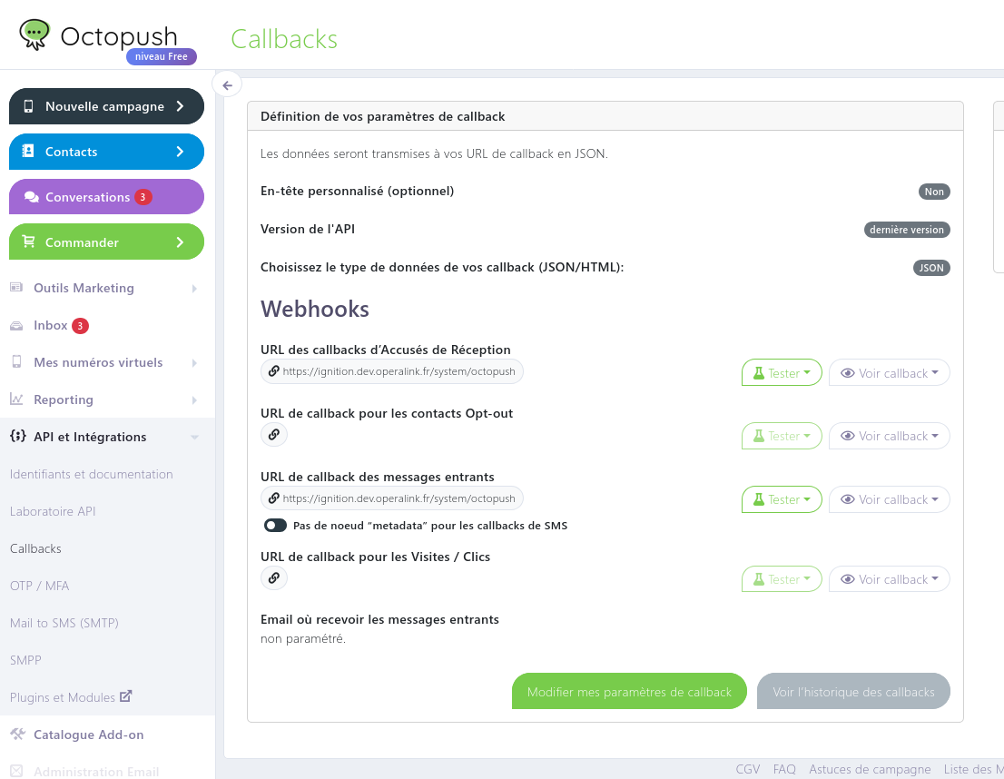
For acknowledgement and delivery-receipt functionality, configure Octopush to POST callbacks to the module's servlet.
- Log into your Octopush account
- Configure the callback URL:
http(s)://[your-ignition-server]/system/octopush
- Set the HTTP method to POST
- If you configured a Callback Authentication Secret on the profile, configure Octopush to send the custom header
X-Ignition-Octopush-Tokenwith that value
Acknowledgement and delivery auditing require the Ignition server to accept HTTP POST requests from Octopush servers at /system/octopush. Ensure your firewall and network configuration allow this traffic. If Disable Callback is checked on the profile, no callbacks are processed.