Git
Overview
The Git module embeds a complete Git client directly into the Ignition Designer, enabling professional version control of project resources without leaving the development environment. It eliminates context switching between the Designer and external Git tools by providing repository initialization, commit management, branch operations, push/pull/fetch, merge conflict resolution, and commit history browsing — all from within the Designer UI.
Features
- Repository Initialization - Wizard-style setup to clone from a remote repository (HTTPS or SSH) or initialize a local-only repository
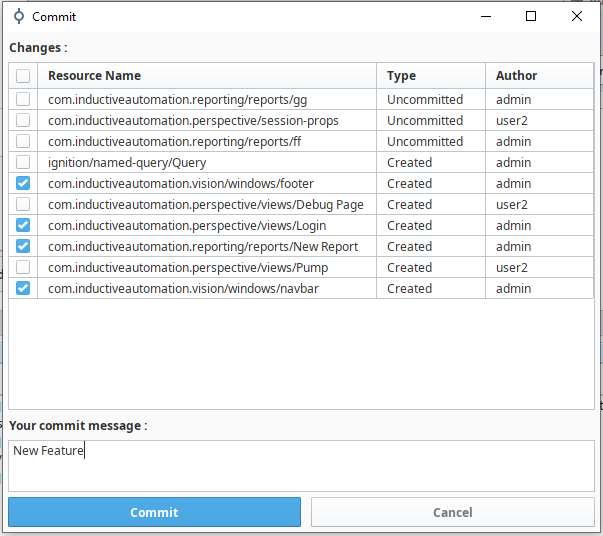
- Commit Management - Select resources, write commit messages, view diffs before committing, and amend previous commits
- Push, Pull & Fetch - Full remote operations with multi-remote support and per-remote credentials
- Branch Management - List, create, checkout, and delete branches with automatic stash/restore of uncommitted changes
- Merge Conflict Resolution - Dedicated UI with per-file "Accept Ours/Theirs" resolution and conflict diff viewer
- Side-by-Side Diff Viewer - Review changes before committing with color-coded line comparison
- Commit History Browser - Paginated log viewer with drill-down into changed files and historical diffs
- Revert & Checkout - Undo specific commits via revert, or inspect past states via detached HEAD checkout
- Dockable Panels - Always-visible Commit and History panels tabbed alongside the Project Browser
- Gateway Export - Export tags, images, and themes directly to version control
- Metadata Noise Suppression - Automatically filters out
resource.jsonandthumbnail.pngclutter - Commissioning Automation - File-based configuration for automated deployment and initialization
Technical Specifications
| Specification | Value |
|---|---|
| Module ID | com.operametrix.ignition.git |
| Module Name | Git |
| Current Version | 1.0.3 |
| Minimum Ignition Version | 8.1.0 |
| Required Module | None |
| Scope | Gateway, Designer |
| License | Beerware |
Architecture
The module follows Ignition's multi-scope architecture with Gateway (backend) and Designer (UI) components communicating via RPC:
- The Gateway scope handles all Git operations using Eclipse JGit — clone, commit, push, pull, fetch, merge, branch management, and diff generation
- The Designer scope provides the full UI — toolbar buttons, status bar, dockable panels, and popup dialogs
- When a user performs an action in the Designer (e.g., commit, push), the request is sent to the Gateway via Ignition's RPC mechanism
- The Gateway executes the Git operation on the project directory (
{gateway_data}/projects/{projectName}) - Authentication credentials are stored per-remote per-user in the Gateway's internal database
- Results are returned to the Designer, which updates the UI accordingly
Designer UI Components
- Status Bar — Shows current branch, remote, and user identity with quick-access buttons
- Toolbar — Push, Pull, Commit, History, Export, and Repo management buttons
- Dockable Commit Panel — Always-visible panel for at-a-glance uncommitted changes and inline commits
- Dockable History Panel — Always-visible commit log with ref badges and Push/Fetch/Pull buttons
Screenshots
Commit Popup:
Git Toolbar:

Git Status Bar:
